ClickUp for accountants works best as a project and deadline management layer, not as a replacement for accounting software. Firms running hundreds of clients and thousands of tasks a month use ClickUp for client onboarding, recurring tax and payroll tasks, and workload visibility, while keeping invoicing, journal entries, and the general ledger in tools like QuickBooks Online or Xero.
ClickUp markets itself as one app to replace them all, and it offers templates that can be used for sending invoices, populating journal entries, and updating a general ledger. In our opinion, it is a lot more efficient to use accounting software like QuickBooks and Xero for those tasks.
Where ClickUp is most valuable for accounting firms is simplifying client onboarding, streamlining project accounting, and tracking outstanding tasks across the team.
This article walks through the step-by-step process of implementing ClickUp for an accounting firm, the good practices and common pitfalls, and how to take the setup further with integrations like Rize for automatic time tracking.
Common Pitfalls
ClickUp's flexibility is one of its biggest strengths, but it can also be a drawback. Accounting firms can use ClickUp for nearly any process, including ones that aren't actually well-suited for the platform. As a result, many firms end up frustrated with their ClickUp implementation and eventually abandon it.
Using ClickUp for Everything
Because ClickUp is marketed as an "all-in-one" platform, many accounting firms try to recreate all their existing systems inside ClickUp when they first start using it.
For example, some firms use ClickUp's accounting journal templates to send invoices or update journal entries. However, dedicated accounting software like QuickBooks Online is much more efficient because:
- QuickBooks Online lets you file taxes electronically, whereas using ClickUp means manually entering data into government portals.
- QuickBooks automatically generates key financial reports like Profit & Loss statements and balance sheets. Recreating these in ClickUp requires extensive customization.
Using ClickUp for accounting firms in this way often leads to unnecessary extra work.
Similarly, some accounting firms attempt to use ClickUp as their CRM, manually entering details about both current and prospective clients. However, it's far more efficient to use a dedicated CRM platform because:
- Tools like HubSpot or Pipedrive automatically log all client communications through Gmail or Outlook integrations.
- CRM platforms also offer purpose-built pipeline management tools that let sales reps move deals between stages, while ClickUp's general task management simply shifts tasks between statuses.
Instead of rebuilding CRM and bookkeeping functions inside ClickUp, it's much more efficient to integrate ClickUp with specialized tools. According to ClickUp's help documentation, the QuickBooks Online Sync integration is now available in beta on Business Plus and Enterprise plans, syncing customers two ways and invoices one way into ClickUp tasks; firms on lower plans can connect the two through Zapier. ClickUp also offers a native HubSpot integration, so a "won" deal can trigger client folder creation automatically. On the time tracking side, Rize offers a native ClickUp integration that writes tracked time entries back to ClickUp tasks, alongside integrations with QuickBooks, Xero, and other tools accounting firms rely on.
Reporting Inside ClickUp
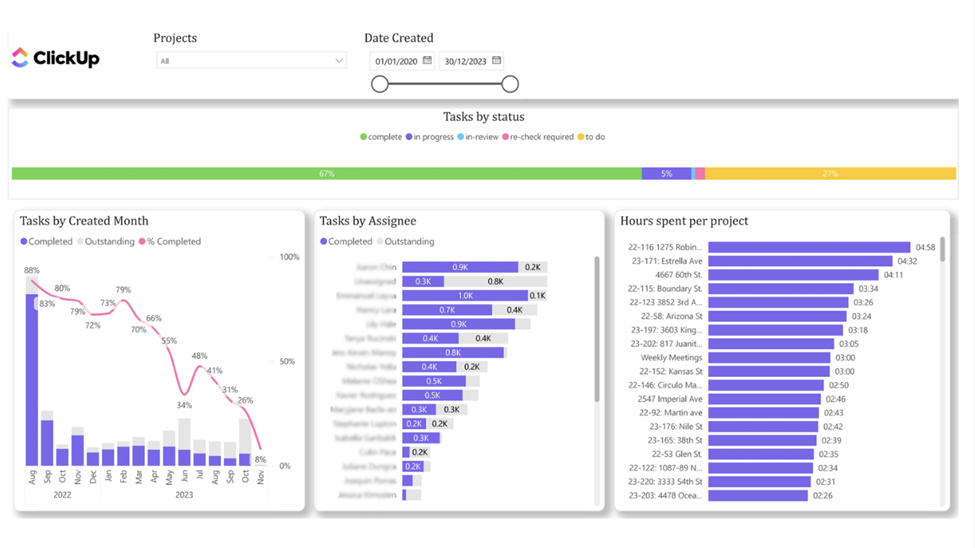
Many accounting firms overestimate ClickUp's reporting capabilities when they first start using it. The truth is that the charts in ClickUp are designed for very specific use cases. As soon as you try to customize them or create your own analysis you will face formatting errors and limitations.
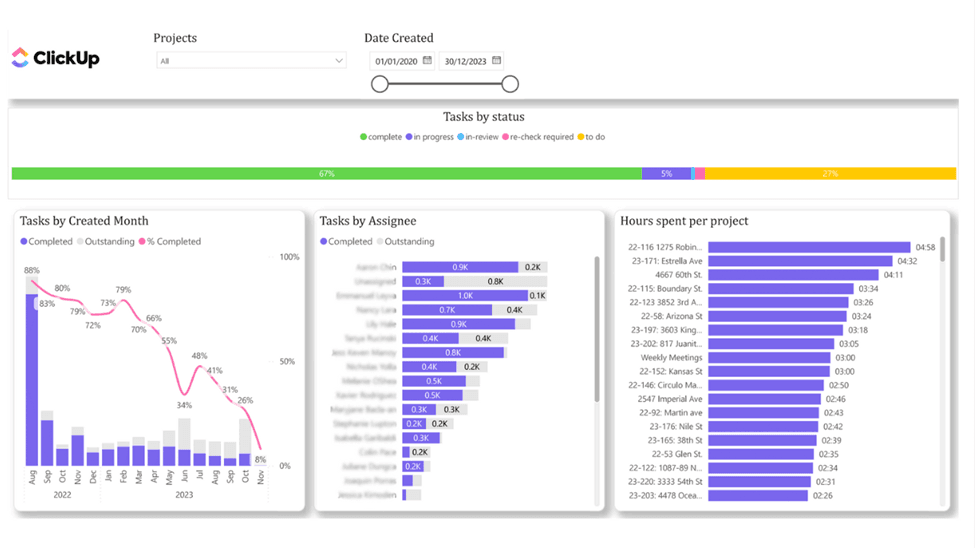
According to Vidi Corp, a common workaround is to integrate ClickUp with Power BI to automatically extract the data, then install free ClickUp dashboards to visualize it quickly and customize further analysis.
Task Structure Mistakes
A good task structure makes it easy to see who is responsible for each task's completion and gives that person all the information they need. There are several task structure mistakes that accountancies often make:
- Assigning a task to multiple people. This mainly happens with big tasks that require multiple people to collaborate, or when a quality control manager and an accountant are added to the same task. Team members get confused about who is responsible. Instead, break down tasks into subtasks and assign one person to each subtask.
- Frequent reassignment. This often happens on big tasks when team members assign someone else after they complete their part. Again, it is better to break down big tasks into subtasks and assign one person to each subtask.
Benefits of Implementing ClickUp for Accounting Firms
Never Miss a Deadline
ClickUp offers accounting firms several task features to keep track of deadlines.
First, you can create recurring tasks for tax returns, bank reconciliation, payroll, and VAT/GST returns for every client.
Second, ClickUp's calendar view shows which tasks are due every day, which increases visibility on current team priorities.
Finally, you can create custom views in ClickUp to show all tasks that are due today or overdue. These views keep the team focused on urgent work first, and every team member can filter them to only see their own tasks.
Quality Control
ClickUp helps accounting firms control the quality of task completion through checklists. When team members open a task, they see the checklist of steps that need to be completed, so no important step is missed.
CPA firms can also attach documents to tasks. Attaching SOPs to tasks is another way to make sure team members follow the process to a consistent standard.
Easy Client Onboarding
Accountancies usually have a standard set of tasks when onboarding a client: getting access to their QuickBooks Online, collecting an EIN, setting up Hubdoc, and so on. ClickUp has multiple features that streamline this.
ClickUp's integrations with CRMs like HubSpot enable automatic task folder creation as soon as you mark a deal as "won".
Accounting firms can also create ClickUp folder templates that include the full list of onboarding tasks. When a new client joins, you deploy the template instead of creating tasks one by one. ZenPilot, a ClickUp consultancy that has implemented it for hundreds of service businesses, builds templated client structures into every rollout.
Track time automatically in ClickUp
Rize captures every billable minute and sends time entries directly to ClickUp. No manual timers, no missed hours.
Start Free Trial5 Steps to Implement ClickUp for Accounting Firms
1. Design Your Structure
A well-designed ClickUp structure makes it easy to find outstanding tasks for every team and every client. The hierarchy we suggest is:
- Workspace: you would usually only have one workspace for your entire company, named after your accounting firm.
- Spaces: we recommend one space per department, e.g. tax, bookkeeping, operations.
- Folders: used to group tasks by client.
- Lists: individual projects for every client, e.g. payroll, tax return, bookkeeping.
- Tasks: client deliverables, e.g. a finished tax return or a generated payslip.
- Subtasks: actionable items that can be delegated to a single person.
Following a clear structure like this keeps you organized and ensures you can always find your tasks.
2. Build Templates
ClickUp allows you to create templates for lists and folders, which are standard collections of your ClickUp objects.
We recommend developing a folder template you can deploy every time you onboard a new client. This folder should contain individual lists named after the services you provide to that client.
You can deploy the template manually for each new client, or trigger deployment on an event like marking the deal as "won" in your CRM.
Once you create the folder template with the lists you need, the next step is task templates, which you use to populate those lists. Task templates should contain checklists and recurring tasks.
3. Create Checklists
Checklists are a quality control measure: a list of activities that need to be checked off before a task counts as complete. You can also assign individuals to checklist items to make clear who has authority to mark each activity as done.
We recommend creating the checklist inside the task and then saving the whole task as a template. The next time you create the same task for another client, the checklist comes with it.
4. Set Tasks to Recurring
Tasks that repeat periodically need to be set to recurring. If you run an accounting firm, most of your client tasks will be recurring.
Select the task, set the schedule, and optionally show recurring tasks inside your calendar so deadlines stay visible.
5. Track Time and Task Completion
Tracking time matters when using ClickUp for accounting firms because time is the main direct cost of client services. It lets you analyze the profitability of each client and determine whether the engagement is worth the fee. Finance leaders who need firm-wide visibility into utilization and profitability will find Rize's time tracking for finance leaders purpose-built for this use case.
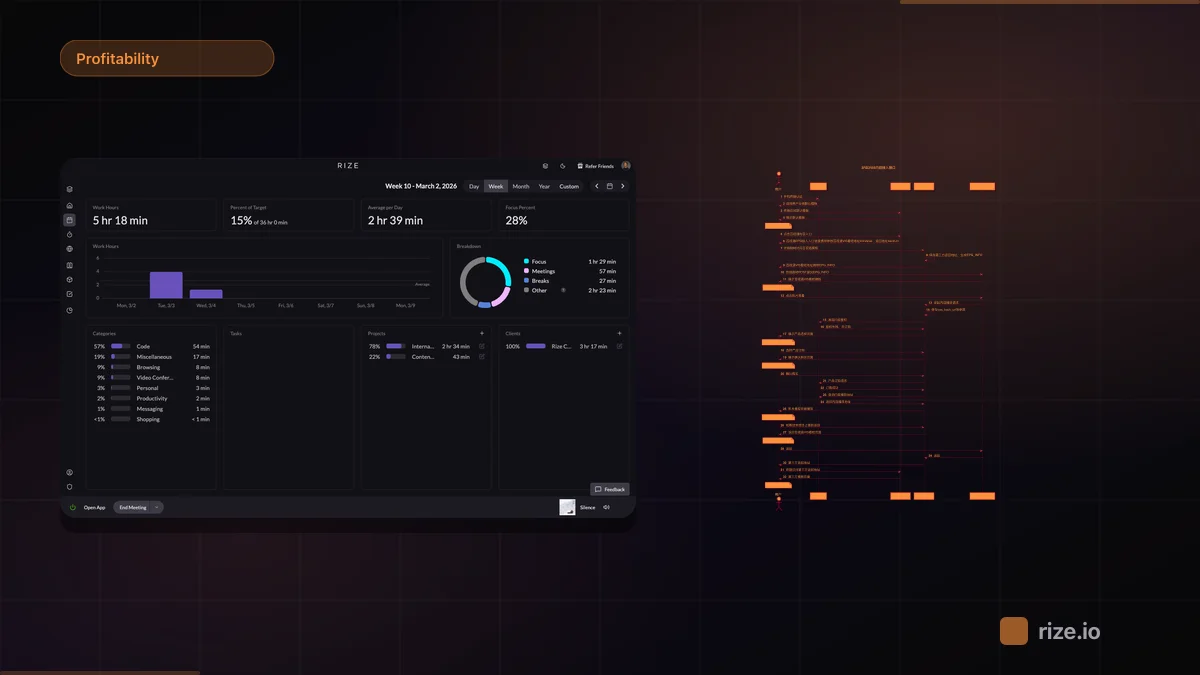
You can track time manually against every task in ClickUp. Alternatively, install Rize on Mac or Windows and use AI-powered automatic time tracking. Rize tracks desktop activity, automatically allocates time to clients and tasks, and as a native ClickUp integration sends those time entries directly back to ClickUp.

You can track task completion by opening your lists and setting the status filter to "open". Basic, but useful when you are just getting started.
For a more advanced view, Vidi Corp's Power BI ClickUp dashboards make it easier to track the number of tasks by status and project.
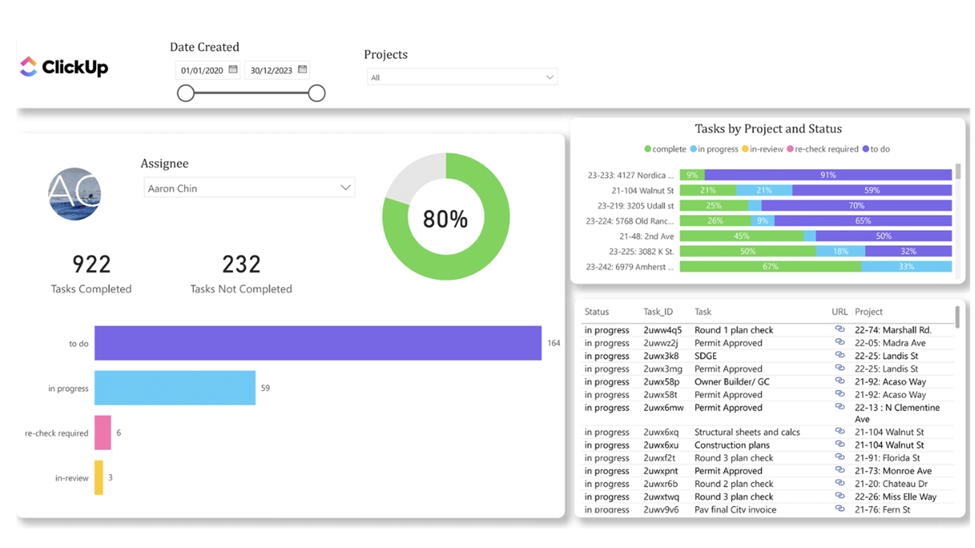
Power BI dashboards also help you audit whether every team member enters data properly. They make it easy to spot who has not logged time entries or updated task statuses in a while, so you can have a direct conversation about why accurate data entry in ClickUp matters.
Conclusion
ClickUp can help accounting firms become far more organized when implemented properly. Keep the workspace well-structured, build the templates you need, and resist the urge to run your general ledger or CRM inside it.
To get the most out of ClickUp, lean on integrations: your CRM for trigger-based workflows, Rize for automatic time tracking that writes entries back to ClickUp, and Power BI for reporting. Firms evaluating practice management platforms alongside ClickUp should also see Rize for accounting firms, our Karbon alternatives breakdown, the best time tracking software for accountants, and how flat-fee firms measure client profitability. If you're evaluating alternatives to manual timers, see how Rize compares to Toggl, Clockify, and Timely.
Stop losing billable hours in ClickUp
Rize automatically tracks time across every client and sends entries straight to ClickUp. No timers, no guesswork, just accurate billable hours.
“Rize has been a no-brainer for me.” — Ali Abdaal Read more →