As a freelancer, every untracked hour is money left on the table. But switching between a timer app and your actual work breaks the focus that makes you valuable in the first place. The best time tracking tools for freelancers run in the background and capture your billable hours automatically, so you can bill accurately without thinking about tracking.
Here are the top tools for freelancers who want accurate time data without the daily chore of manual timesheets.
| Tool | Best For | Auto-Tracking | Pricing |
|---|---|---|---|
| Rize | Freelancers who forget timers and lose billable hours | Fully automatic, zero-touch AI categorization | From $23.99/mo Pro (annual); Basic at $9.99/mo |
| Toggl Track | Freelancers who prefer manual timers | Manual start/stop with optional background timeline | Free tier; Starter at $9/user/mo |
| Clockify | Budget-conscious freelancers starting out | Manual timers and manual entry only | Free (up to 5 users); Pro at $7.99/user/mo |
| Harvest | Freelancers who need integrated invoicing | Manual timers with browser and app integrations | Free (1 seat, 2 projects); Teams at $9/seat/mo (annual) plus usage fees |
| Moxie | Running an entire freelance business in one tool | Manual timers with project-linked entries | From $16/mo for solo freelancers |
| FreshBooks | Freelancers who need accounting + time tracking in one place | Manual timers with project billing | Lite at $11.50/mo; Plus at $20/mo |
What Freelancers Actually Need from Time Tracking
Freelancer time tracking is different from team tracking. You do not need admin dashboards or team permissions. You need three things:
- Automatic capture: If you have to remember to start a timer, you will forget. Passive time tracking that runs in the background is the only way to capture every billable minute.
- Client categorization: You juggle multiple clients daily. Your tracker needs to know that Figma time belongs to Client A and Google Docs belongs to Client B without you telling it every time.
- Simple reporting: At the end of the week or month, you need a clean summary you can attach to an invoice or share with a client. Look for tools with built-in billable time reporting so you don't have to export and reformat data.
1. Rize
Rize is built for the way freelancers actually work. It runs silently in the background and uses AI to categorize every application, website, and document by client and project. There are no timers to start, no daily review, and no end-of-week timesheet reconstruction from memory.
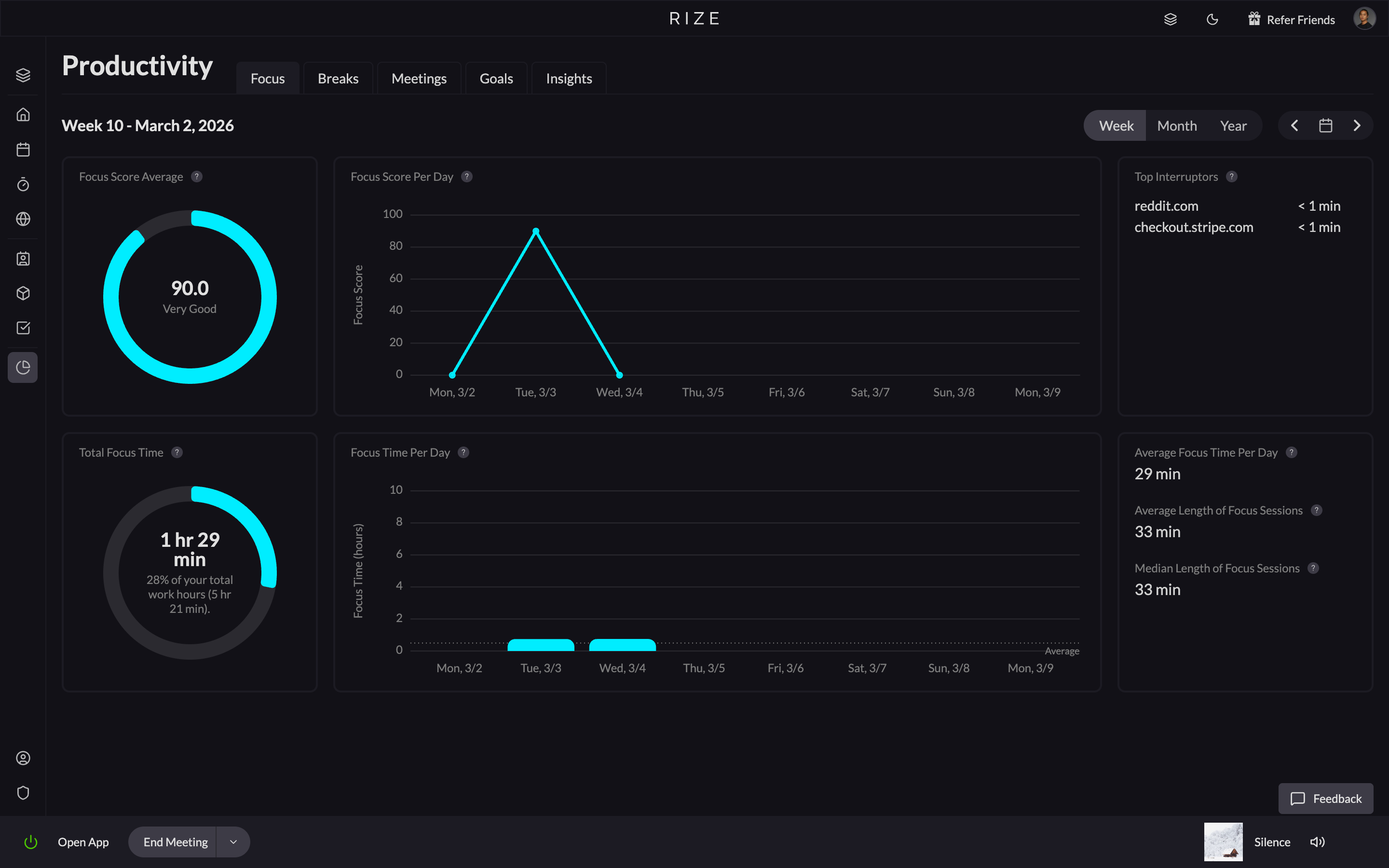
Beyond billing, Rize gives you focus analytics that show when you do your best deep work, how often you context-switch, and when you should take breaks. As Quaestor co-founder Kevin Hsu puts it: "With Rize I never need to ask myself where I'm spending my time. Instead, I can ask myself how I want to spend my time." For freelancers who charge by the hour but also want to understand and improve their work patterns, this combination is hard to beat.
- Tracking Method: Fully automatic, zero-touch. No timers needed.
- Client Categorization: AI auto-categorizes by client and project from your app and URL usage. Impulse Lab, a 6-person web AI agency, reports 98% client billing accuracy using Rize's automatic categorization.
- Reporting: Automatic daily and weekly reports with exportable PDFs and CSVs.
- Privacy: No screenshots, no keylogging. Local-first data processing.
- Pricing: Basic at $9.99/month; Pro at $23.99/month with client tracking, scheduled reports, and integrations (annual). Free 7-day trial.
Key strengths
- Fully passive tracking that captures every billable minute without user input
- AI-powered client categorization with reported 98% accuracy at production agencies
- Focus analytics and break reminders that help freelancers improve work patterns
Possible limitations
- Desktop only — no mobile time tracking for on-the-go work
- Invoices are generated and sent from Rize, but clients cannot pay by card on the invoice itself
- Requires an always-running desktop app, which may not suit tablet-based workflows
Start tracking time automatically
Join thousands of professionals who stopped guessing where their time goes. Free for 7 days.
Start Free Trial2. Toggl Track
Toggl Track is the most popular timer-based tracker for freelancers. You start a timer when you begin a task, tag it with a client and project, and stop when you finish. The interface is clean and the mobile apps are strong. Toggl also has a background Timeline feature that records which apps you used, but you still need to manually convert that data into time entries.
- Tracking Method: Manual start/stop timers with optional background timeline.
- Client Categorization: Manual project and client tagging per entry.
- Reporting: Customizable dashboards with CSV and PDF exports.
- Pricing: Free tier (up to 5 users); Starter at $9/user/month.
Key strengths
- Clean, intuitive interface with strong mobile apps for on-the-go tracking
- Generous free tier that covers most solo freelancer needs
- Background Timeline feature gives a safety net for forgotten timers
Possible limitations
- Still fundamentally manual — Timeline data must be converted to entries by hand
- No AI categorization, so every entry requires manual client and project tagging
- Advanced reporting and integrations locked behind paid tiers
3. Clockify
Clockify is the go-to free option. The free plan (now capped at 5 users as of April 2026) still includes unlimited tracking across unlimited projects, though billable rates and CSV/Excel report exports have moved to paid plans. For freelancers just starting out or those watching every dollar, Clockify covers the basics. The tradeoff is that tracking is entirely manual and there is no AI categorization. You get what you put in.
- Tracking Method: Manual timers and manual entry.
- Client Categorization: Manual project and client assignment.
- Reporting: Basic reports with exports. Invoicing available on paid tiers.
- Pricing: Free (up to 5 users) for core tracking; Pro at $7.99/user/month (annual) for invoicing and budgets. Billable rates and report exports require a paid plan.
Key strengths
- Completely free with unlimited projects and unlimited tracking
- Available on every platform including web, desktop, mobile, and browser extension
Possible limitations
- No automatic tracking or AI categorization — everything is manual entry
- Invoicing and advanced features require a paid upgrade
- Reports are basic compared to tools with automatic data capture
4. Harvest
Harvest is built for freelancers and small teams who need a direct path from tracked hours to paid invoices. If invoicing-ready time data is your top priority, Harvest is one of the strongest options. You track time, Harvest calculates the billable amount, and you send an invoice from the same tool. The integration with Stripe and PayPal means clients can pay directly. Tracking is manual, but the invoicing workflow is one of the best.
- Tracking Method: Manual timers with browser and app integrations.
- Client Categorization: Manual project and client setup.
- Reporting: Strong profitability reports and budget tracking.
- Pricing: Free (1 seat, 2 projects); Teams at $9/seat/month (annual) plus usage-based fees for additional invoices, projects, and clients.
Key strengths
- Built-in invoicing with Stripe and PayPal — tracked hours become invoices in one step
- Strong profitability and budget tracking per project and client
Possible limitations
- Tracking is entirely manual with no automatic or background capture
- Free tier limited to two projects, which most freelancers outgrow quickly
- No AI features for categorization or productivity insights
5. Moxie
Moxie is a freelancer business platform that goes beyond time tracking to include proposals, contracts, invoicing, and client management. Time tracking feeds directly into invoices and project budgets. If you want one tool to run your entire freelance business rather than stitching together five different apps, Moxie is worth considering.
- Tracking Method: Manual timers with project-linked entries.
- Client Categorization: Built into the project and client management system.
- Reporting: Revenue dashboards, project profitability, and client history.
- Pricing: Starts at $16/month for solo freelancers.
Key strengths
- All-in-one platform covering proposals, contracts, invoicing, and client management
- Time entries feed directly into invoices and project budgets with no export step
Possible limitations
- No automatic time tracking — all entries are manual timer-based
- Higher starting price than dedicated time trackers
- Feature breadth means the time tracking module is less specialized than standalone tools
6. FreshBooks
FreshBooks is an accounting platform with built-in time tracking. Freelancers who already use FreshBooks for invoicing and expense management can track time within the same tool and convert entries directly into line items on invoices. Time tracking is manual, but the tight connection between tracked hours, expenses, and client billing makes it a strong choice for freelancers who want accounting and tracking under one roof. For a detailed breakdown, see our FreshBooks time tracking comparison.
- Tracking Method: Manual timers with project-linked billing.
- Client Categorization: Manual project and client assignment tied to accounting records.
- Reporting: Profit and loss reports, expense tracking, and tax-ready summaries.
- Pricing: Lite at $11.50/month (5 clients); Plus at $20/month (50 clients).
Key strengths
- Full accounting suite with invoicing, expenses, and tax prep alongside time tracking
- Tracked hours convert directly into invoice line items with no export step
Possible limitations
- No automatic or AI-powered time tracking — all entries are manual
- Client caps on lower tiers (Lite limited to 5 billable clients)
- Time tracking is secondary to accounting — less specialized than dedicated trackers
Start tracking time automatically
Join thousands of professionals who stopped guessing where their time goes. Free for 7 days.
“Rize has been a no-brainer for me.” — Ali Abdaal Read more →
How to Choose the Right Time Tracker as a Freelancer
Use these criteria to narrow your decision based on how you actually work:
- Automatic vs. manual capture: Do you reliably start and stop timers, or do you forget when deep in client work? If you forget, only a fully automatic tracker will give you accurate data.
- Client categorization: How many clients do you juggle at once? If more than two, look for AI-powered categorization that assigns time without manual tagging.
- Invoicing integration: Do you need tracked hours to flow directly into invoices, or are you comfortable exporting data to a separate invoicing tool?
- Privacy model: Some tools take screenshots or log keystrokes. If you handle sensitive client data, choose a tracker with local-first processing and no screen capture.
- Platform coverage: Check that the tool runs on your operating system. Some trackers are desktop-only, others are web-first with mobile apps.
- Reporting depth: Do you need simple weekly summaries for invoices, or do you want focus analytics and productivity insights to improve how you work?
- Price relative to recovered revenue: A tracker that costs $24/month but captures even one extra billable hour per week pays for itself many times over. Use a billable hours calculator to estimate the gap, then evaluate cost against the revenue you currently lose to untracked time.
If you forget to start timers and lose billable hours to memory gaps, Rize solves that problem completely with automatic tracking. If you are disciplined with timers and want the cheapest option, Clockify is free. If invoicing is your biggest pain point, Harvest, FreshBooks, or Moxie connect tracked hours to payments in one step. I'll be honest about how we got here: we tried every manual tracker on this list before deciding to build an automatic one. The manual approach kept failing for the same reason it fails for freelancers — nobody remembers to click the button when they're deep in actual work. Leonard Roussard, founder of Impulse Lab, put it best: "I installed it and forgot about it for two weeks. When I came back, everything was tracked. I could trust the data completely."
The real question is how much revenue you are losing to untracked time. Some estimates suggest that manual time tracking misses 15-40% of billable hours. For a freelancer billing $100/hour and working 30 billable hours per week, even a 15% gap means over $23,000 per year in lost income. An automatic tracker that costs $24/month and closes that gap pays for itself in the first day. See what independent reviewers are saying about Rize, explore our detailed time tracker comparisons, or try it free for 7 days and see how many hours you have been missing.

![Rize vs Toggl: Which time tracker is best? [2026]](/_next/image?url=%2Fassets%2Fblog%2Fhero%2Frize-vs-toggl-for-agencies.webp&w=3840&q=75)