
Shipped
- Standalone Mac Desktop Application - We launched a standalone macOS desktop application so you don’t have to keep going to the Rize website. We want to make Rize easier to check throughout the day.
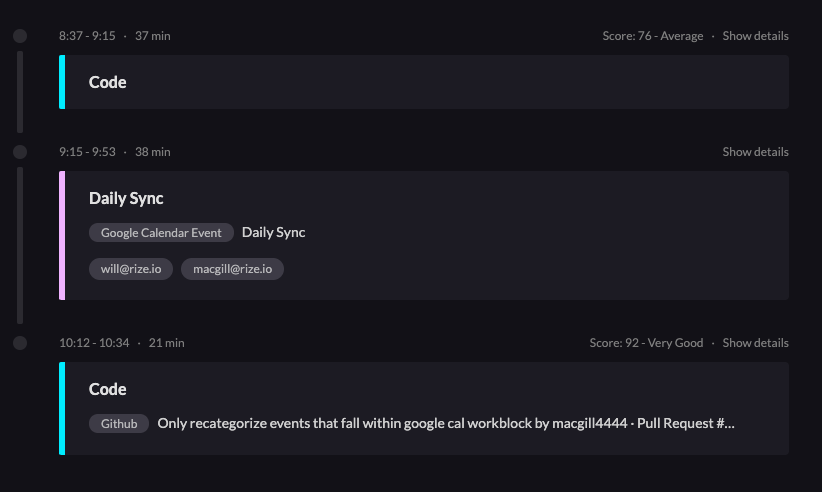
- Vertical Timeline - You will now see all meeting and focus times listed chronologically below your timeline. This provides a readable snapshot of your day.
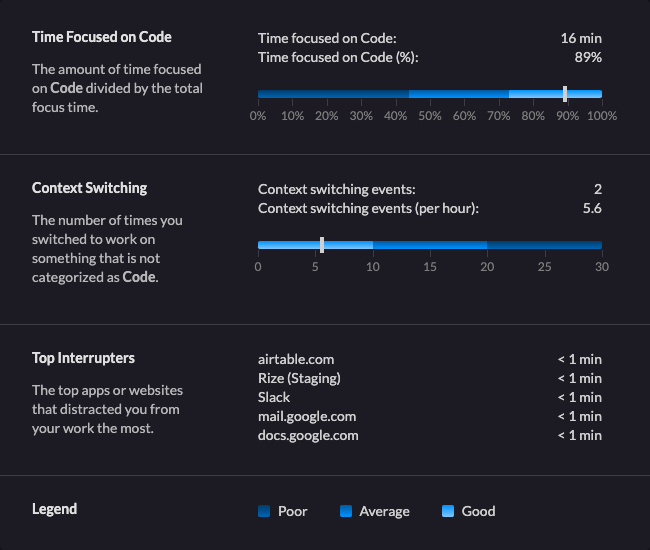
- Focus Time Details - You can click on “Show Details” in the corner of every focus and meeting time in the Vertical Timeline. If it’s a focus time, you’ll see a section that breaks down how focused you were, how much you were context switching, and what the top interrupting sites and applications were.
- Dashboard Redesign - We made some big changes to the dashboard by adding the vertical timeline. We moved scores to the sidebar and we removed Productivity Score and Notes. A lot of these changes were based on the input we received in the feedback survey.
Bug Fixes
- Notifications Link Bug Fix - Occasionally the link for the desktop notifications would not work. This was due to the link being cleaned up in garbage collection. We’ve fixed that issue and the notification links should be working properly moving forward.
- Big Sur Auto-updater Bug Fix - We upgraded our desktop app to fix a bug with auto-updater on Big Sur. The app will close and update but not relaunch. If you’re on Big Sur you’ll have to manually relaunch the Rize app.
- Google Calendar Integration Approved - When we launched our Google Calendar Integration last week I had needed to reapply for approval from Google for the calendar permission scope we were requesting. I received that approval last week.
Up next
- Interactive Timeline - This item is next on our to-do list!
- Engaging with Focus and Meeting Times - We want to get feedback from you all about what is helpful here and how you best want to engage, create, and edit focus and meeting times.

.png&w=3840&q=75)