Product

TeamsTestimonialsPricing
Command E - Your Everything Search

Command E - Your Everything Search

macgill davis · March 30, 2021

Each week we’ll select a Productivity Tool of the Week. We promote tools that we’ve personally tried and tested with our honest feedback.


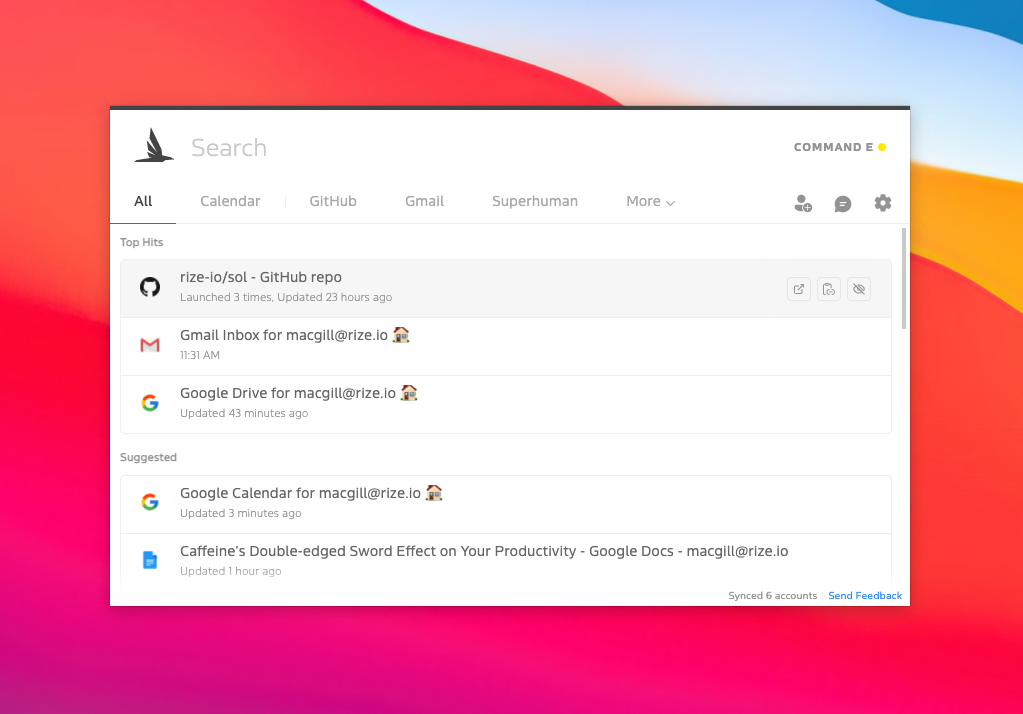
CommandE is a desktop app that lets you easily access pretty much anything on your computer or in the products you use like email, documents, and calendar. 


The product gets its name from the keyboard shortcut used to open it, Command + E. It’s similar to Spotlight Search on macOS but with a lot more functionality. The biggest difference between Spotlight Search and CommandE is that the latter integrates with the products you use day to day. I’ve also found the typeahead search to be a lot more accurate.

I’ve integrated CommandE with Gmail, Github, Google Drive, and Twitter. I found it really helpful in opening up pull requests for Rize and jumping quickly into my Calendar or Google Drive. I used to navigate to these spots using Bookmarks in Chrome, but being able to use keyboard shortcuts with CommandE saves a few seconds each time. I love those small optimizations that end up compounding for big efficiency gains over the course of a day or week.

Installing and integrating with CommandE was extremely simple and quick, despite having to integrate with many third party applications. They’ve got an awesome user guide, which dives into how to use the tool as well as security and privacy. 

Overall, I’ve found CommandE to be a welcomed product to my daily toolset that makes my life just a little bit easier each day.

Macgill Davis is the cofounder of Rize - a simple, intelligent time tracker that improves focus and builds better work habits.

Macgill Davis
Macgill DavisCo-Founder & CEO

Macgill is the co-founder and CEO of Rize, an automatic time tracking app for agencies and professional services teams. He writes about productivity, time management, and building better work habits.

Frequently Asked Questions

Command E is a desktop app that lets you search and access files, emails, documents, and calendar events across your computer and connected apps using a keyboard shortcut. It's similar to Spotlight Search on macOS but integrates with products like Gmail, Google Drive, Github, and Twitter, making it more powerful for everyday work.

While both are search tools, Command E integrates with third-party apps and services you use daily, whereas Spotlight Search only searches your local computer. Command E also has more accurate typeahead search results and allows you to jump directly into emails, documents, and pull requests without leaving the search interface.

Yes, installing and integrating Command E is extremely simple and quick, even when connecting multiple third-party applications. The tool comes with a comprehensive user guide that covers setup, usage, security, and privacy concerns.

Command E saves time by letting you access files, emails, and apps through keyboard shortcuts instead of navigating through bookmarks or multiple windows. These small time savings compound throughout your day or week, leading to significant efficiency gains—similar to how time tracking with tools like Rize helps you identify and optimize your work habits.

Command E integrates with popular productivity tools including Gmail, Google Drive, Github, Twitter, and your computer's local files. The app supports many third-party integrations, so you can customize it to work with the specific products you use daily.

Related Posts